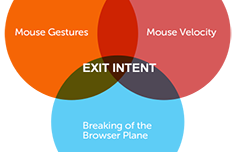
Google I/O conference is now streamin live.

When I’ve read Oauth specs and I did not understand anything

(Reblogged from apijoy)

Team Foundation Server doing a gated check-in.

Waited 20mins for TFS to finish gated check-in and 1 unit test fails for absolutely NO REASON!

Anonymous asked: Hello Brad, I was checking out the jquery plugin that you wrote, but the demo seems to be down, any chance you've got another copy of it lying around?

Yes, try: http://www.w3portals.com/SDevents.html

It’s worth diving into Javascript

When I get questions from non-programmers on what language to learn first, I’m fairly convinced that my best suggestion, as of today, is to seriously take up Javascript. 

Even though Javascript has quite a few quirks and shortcomings, I would have to say that it is the most rewarding language to get into since there is so much you *can* do with it. Not to mention, every company needs a javascript developer (or will soon). Also, javascript isn’t really as bad as people tend to think, it is really just the most misunderstood. So if you’re going to learn it, you’re going to have to dive deep.

It has also become the swiss-army knife of programming languages. Mostly thanks to the amazingly successful projects like jQueryGoogle’s V8, and Node.js. Not to mention the fast-growing community that has sprung up around Node’s Packaged Modules (NPM) 

So to get started, check out:

I also suggest using these tools/libraries to get your hands dirty.

Have fun and keep making javascript better!

Hackathon tools for 2013

Here’s what I’m currently using for my hacks / prototypes. Keep in mind a lot of these tools are chosen because they get you up and running fast and\or have some widespread use. Team-friendly tools are key.

Machine
MacBook Pro - yep, finally ditching my PC, but still have a VM for asp.net projects. 

IDE / Text Editor
Sublime Text - an amazing text editor for working with almost any type of open source project. Command palette makes it fun to learn and gets better the more I use it.

Project Mgmt
Trello - try it out. May still need Basecamp for some projects, but this is a great tool to try out. 

Hosting 
http://nodejitsu.com 
http://heroku.com 

Source Control & Issue Tracking  
Git + GitHub - a no brainer at this point. 

Open source Tools

Bootstrap - mainly because i know it so well and gets the job done.
Foundation3 - a pretty awesome responsive front-end lib. Nice to have a decent alternative to bootstrap.
Node.js - changing the way the web is built. NPM rocks.
Meteor - this is an amazing jumpstart to building awesome apps. Serves as full-stack.  
MongoDb - a must have document db, try MongoHQ.

Other tools/services 

Hackpad - great for creating docs.
Cloudmine - back-end as a service
LaunchRock - creating a landing page in minutes
Keynotopia - great for a non-coder to build a usaable UI. I usually use HTML though.
Photoshop - duh.
AppGyver - build a mobile prototype from UI images in minutes.


If you think I’m missing anything, let me know. I suppose I could list some wireframing tools, but I rarely use them.

(Reblogged from arielseidman)

My choice of champagne for tonight.
Happy New Year!! #2013

Querying Abstract Multi-Map Indexes in RavenDB (C#)

So… let’s say you have 2 similar classes in your system, like User & Person.

Now lets say we’d like to return those documents into a single list. In order to do this you simply need to define the “AbstractMultiMapIndex”, like so:

I call it the People index, (because Users are people too!)

After we’ve done that we need to create that index, like so (on App_Start):

 IndexCreation.CreateIndexes(typeof(PeopleIndex).Assembly, ds);

Now… all that’s left is creating an Action like so:

All this does, is execute the query on the index and return the results to the View (with a dynamic ViewBag)

Enjoy!

See last post on Initializing RavenDB with StructureMap

Initializing RavenDB in MVC4 with StructureMap

I hear more and more .Net devs are starting to get into the world of NoSQL, partly in thanks to the insanely awesome product, RavenDb (from the builders of RhinoMocks and NHibernate Profiler). I feel pretty strongly this is one of the biggest contributions to .Net web developers since MVC. 

So, I want to share a very simple/clean way to initialize the RavenDB DocumentStore (on app start) and ALSO the DocumentSession (on each Http Request) using a popular IoC (Inversion of Control) container called StructureMap.

Here’s how it works:

1. Create a new MVC4 project (I’m using the empty template) and use NuGet to install the RavenDB client and StructureMap from the package manager console.

PM> Install-Package RavenDB.Client -pre 
PM> Install-Package StructureMap.MVC4

2. Even though RavenDb is very simple to install locally, try out RavenHQ and get yourself a free db. All you will need is the connection string (under ‘Manage’) after you create a db.

3. Add the RavenDb connection string to your web.config, like so:

<connectionStrings>
 <add name="Raven" connectionString="Url=https://2.ravenhq.com/databases/your-db; ApiKey=your-api-key" />
</connectionStrings>

4. Find the IoC.cs file and add these 2 “Initialize expressions”.

5. Now, just add a Controller which accepts IDocumentSession in the constructor and you’re all set. Like so:

I personally don’t mind having the IDocumentSession in each of my controllers if the project isn’t too large. But there are some other ways to handle this, like a base controller or a ActionFilter, but I may have a forthcoming post on that as well.

If you have any feedback why you like\dislike this approach, I would love to hear your thoughts.

Remember, keep it simple…but not simpler.
Cheers!

Fork me on GitHub